
If you rely on your smartphone rather than physical airport kiosks to clear U.S. customs after an international flight, your return routine is about to experience a digital handoff.
The federal government is retiring the standalone Global Entry mobile application on September 15, as reported by The Points Guy. In its place, U.S. authorities are rolling out an all-in-one platform known as the "Trusted Traveler app."
For frequent flyers, the transition requires minimal administrative effort, but timing matters. Knowing what will carry over, what changes on arrival day, and which airports operate on newer automated entry procedures will help you avoid unexpected bottlenecks at the border.
What Changes on September 15?
For the past few years, enrolled members entering the United States at participating airports could bypass physical Global Entry kiosks entirely. Travelers opened the Global Entry app upon touchdown, submitted a quick photo, completed entry prompts, and proceeded directly to a dedicated officer station.
Starting September 15, that dedicated application will stop functioning. To continue using a mobile device for customs processing, travelers must download the new Trusted Traveler app.

Here is what you do not have to worry about during this transition:
- Your active status stays intact: You do not need to reapply, submit new biometrics, or schedule an interview.
- Existing credentials remain the same: Your Login.gov information and Trusted Traveler membership details will sign into the new app seamlessly.
- The core arrival workflow is unchanged: The mechanism for submitting your arrival photo and receipt on your phone will function just as it did on the previous interface.
In short: your status and permissions carry over automatically. The only required task is replacing an old icon on your smartphone screen with the new version before your next flight home.
Why the Shift? Unified Trusted Traveler Management
Historically, digital tools across federal border operations have operated in silos. The primary upgrade packaged inside the new Trusted Traveler app is consolidation.

Rather than managing a single-purpose clearance tool for international flight arrivals, users will now access an integrated hub that accommodates multiple Department of Homeland Security initiatives, including land-border and regional sister programs like NEXUS (for travel between the U.S. and Canada) and SENTRI (for travel along the U.S.–Mexico border).
Key features housed inside the unified app include:
- Mobile Arrival Verification: Continued mobile check-in capabilities for Global Entry members arriving at supported international entry terminals.
- Application and Renewal Portals: The ability to initiate, monitor, and submit renewal documentation for Global Entry, NEXUS, and SENTRI without being tethered to a desktop browser.
- Cross-Program Navigation: A cleaner path for travelers enrolled in multiple programs or households juggling mixed memberships across different family members.
Do You Even Need the App? Understanding Arrival Alternatives
If you prefer not to download the app—or find yourself landing with low phone battery or poor connectivity—your Global Entry membership remains completely functional.
1. Traditional Portal Kiosks
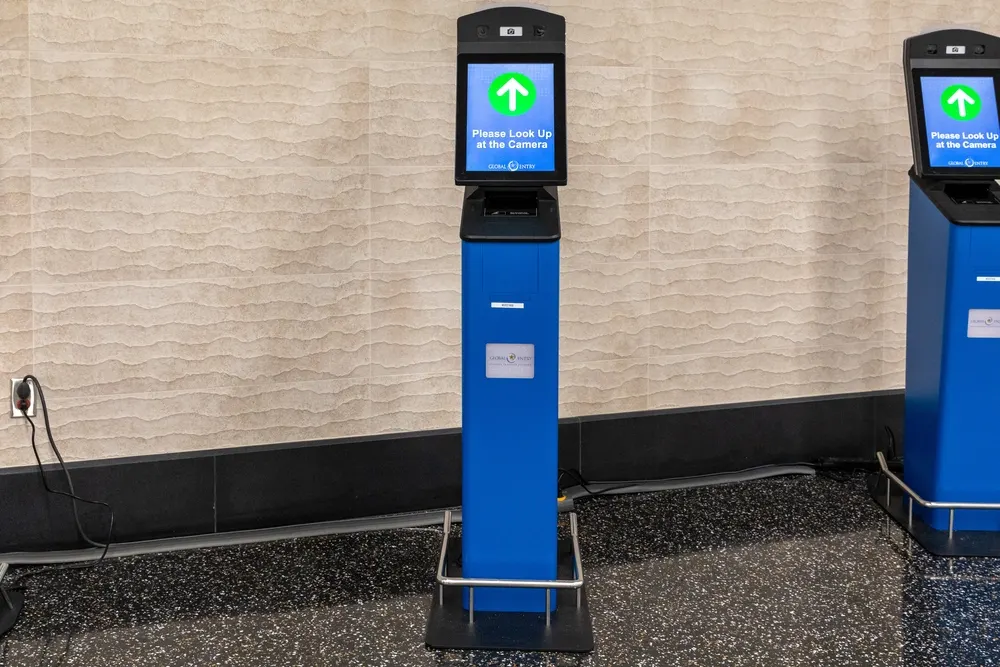
The standard blue Global Entry kiosks located across dozens of U.S. and preclearance international airports will operate as usual. You step forward, have your photo captured, wait for validation, and proceed to the customs exit lane.
2. Next-Generation Biometric Gates
Customs processing at several flagship gateways has already evolved beyond both manual kiosks and mobile screens. U.S. Customs and Border Protection has been actively deploying hands-free biometric camera technology at major hubs, including Boston Logan (BOS), Dallas Fort Worth (DFW), New York–JFK, Philadelphia (PHL), San Francisco (SFO), and Seattle-Tacoma (SEA).
At these terminals, high-speed overhead cameras scan members' facial biometrics as they walk into the customs arrivals hall. The system reconciles identity in seconds, allowing flyers to proceed directly toward an officer without touching a kiosk or tapping an app.
Action Checklist for Your Next International Return
To ensure frictionless border re-entry on or after September 15, take these steps now:
- Audit your device: Check your phone before departing the U.S. Delete the soon-to-be-defunct Global Entry app and install the new Trusted Traveler app as soon as it becomes available in your device’s app store.
- Verify your Login.gov credentials: Test your sign-in details in advance so you do not find yourself locked out on the airport taxiway while attempting to clear customs.
- Remember arrival timing: Submit your mobile clearance only once you have arrived at your entry airport and are deplaning. Early submissions before arrival may time out or fail geo-verification.
- Review membership expiration: Global Entry costs $120 for a five-year term. If your status is nearing its expiration date, utilize the new app interface to submit your renewal well ahead of travel, and pay using a premium travel rewards credit card that offers an application fee statement credit.
Whether you plan your travels months in advance or make spontaneous bookings abroad, keeping your border tools updated saves valuable time. To keep all your flight details, transfer timelines, and packing checklists organized in one convenient spot, coordinate your travel plans with Suitcase2Go.
Frequently Asked Questions
Will the new app cost money to download?
No. The Trusted Traveler app is free to download from official mobile application marketplaces.
Can my travel companions share my app submission?
Every member must have their individual identity verified. Depending on app account setup and age restrictions for minors, family members may be prompted to complete their own verifications or utilize physical kiosks.
What happens if I forget to download the app before landing?
Nothing catastrophic will happen to your entry. You simply step into the standard Global Entry queue and use the airport’s physical kiosks or biometric lanes to clear border control.