
Airlines adjust their schedules continuously. Aircraft swaps, seasonal route recalculations, and revised slot allocations mean that the flight times printed on your initial confirmation email may bear little resemblance to what is actually scheduled to fly. Worse, travelers frequently arrive at the airport only to discover that a schedule shift broke a connection or invalidated their electronic ticket entirely without an automated email alert ever reaching their inbox.
Catching these silent shifts before travel day is not a matter of luck. By understanding the mechanics of how reservations are stored, where notification channels fail, and how to conduct a routine pre-departure audit, you can protect your connections and exercise your consumer rights long before arriving at the gate.

Why Flight Schedule Changes Go Unnotified
When you book an airline ticket, two distinct components are created behind the scenes:
- The Passenger Name Record (PNR): The itinerary reservation holding flight segment codes, dates, and seat assignments.
- The Electronic Ticket (E-Ticket): A separate financial document containing a unique 13-digit number and digital flight coupons (for example, ticket stocks starting with
006for Delta,001for American, or016for United).
When an airline updates its timetable months or weeks in advance—categorized as an advance schedule adjustment rather than day-of-departure irregular operations—several failure modes can prevent you from receiving an alert.
1. Online Travel Agency (OTA) and Corporate Queue Breakdown
If you book through a third-party agency, corporate booking tool, or points travel portal, the operating airline does not communicate schedule alerts directly to you. Instead, the carrier sends an automated Advice of Schedule Change (ASC) message into the booking agency's Global Distribution System (GDS) service queue. As documented in Delta Professional Schedule Change Rebooking Policies, travel agencies are responsible for monitoring these queues, updating canceled or retimed segments, and contacting the passenger. If the agency's automation fails or their queue is backlogged, the change sits untouched in the reservation system while your inbox remains silent.
2. Missing Direct Contact Elements (SSR CTCE / SSR CTCM)
Airlines rely on standardized Special Service Request codes embedded in the booking data to trigger automated SMS (SSR CTCM) or email (SSR CTCE) alerts. If an intermediary agency fails to pass your direct contact details or formats them incorrectly, the operating carrier has no technical route to notify you.
3. The "Out-of-Sync" E-Ticket Trap
This is the most critical failure mode in airline ticketing. An airline system may automatically modify your flight segments in the PNR (for instance, rebooking you on a flight departing 20 minutes earlier). However, an itinerary update does not automatically update the underlying 13-digit e-ticket coupons. Industry rules outlined by major carriers like Delta and American Airlines SalesLink Schedule Change Guidelines note that roughly 20% of schedule changes require manual ticket reissue or revalidation. If your reservation segments change but the e-ticket coupons are not reissued, your booking becomes desynchronized. The flight appears confirmed on the agency portal, but online check-in will fail 24 hours before departure because there is no matching open ticket coupon for the updated segment.
The Pre-Departure Audit Calendar
Airlines generally publish schedule adjustments and batch changes far in advance of the 72-hour window where flights transition into active airport control. To catch changes before preferred alternative flights sell out, run your reservation audit across three specific milestones:
- 60 to 90 Days Before Departure: Major network airlines conduct seasonal schedule adjustments months in advance. Auditing here lets you catch major route cancellations, equipment downgrades, or large timetable shifts while alternative nonstop flights still have award or revenue seats available.
- 30 to 35 Days Before Departure: Carriers enforce agency reissue deadlines (such as automated advisory ticketing time limits) around the 30-day mark. This is the window where neglected partner segments risk dropping.
- 7 to 14 Days Before Departure: Final regional adjustments and tail swaps are loaded. This audit verifies that all connecting intervals remain legally valid.
The 5-Step Booking Audit Workflow
Follow this concrete audit checklist for every ticketed journey, especially those involving multiple operating airlines or third-party bookings.
Step 1: Retrieve All Record Locators and 13-Digit E-Ticket Numbers
Never rely solely on an OTA confirmation number. Open your initial purchase receipt and identify:
- The 6-character alphanumeric airline reservation code (PNR).
- If your itinerary involves codeshares or partner carriers (e.g., an American-ticketed flight operated by British Airways), retrieve the operating carrier's native PNR, which is often different from the ticketing carrier's PNR.
- The 13-digit electronic ticket number for each traveler in your party.
Step 2: Query the Operating Airline's Native Portal Directly
Log directly into the operating carrier's website or native app using the 6-character PNR and passenger surname. Do not rely on your OTA dashboard or booking confirmation email, which rarely poll for real-time GDS segment updates.
Verify that:
- The flight numbers and departure/arrival times match your planned schedule.
- The operating airline matches what you expected.
- The booking status shows confirmed (
HKor "Confirmed") rather than pending review (TK,UN, or "Schedule Change Pending").

Step 3: Calculate Connection Windows Against Minimum Connecting Times (MCT)
Even when both flights on a connecting itinerary remain confirmed, a departure time moved forward by 25 minutes or an arrival delayed by 15 minutes can quietly break your connection.
Every airport maintains a published Minimum Connecting Time (MCT) for domestic-to-domestic, domestic-to-international, and international-to-domestic transfers. If a schedule adjustment compresses your layover below the airport's legal MCT, your ticket becomes technically invalid. Even if gate agents let you board the first segment, luggage systems will flag the connection, and any delay will forfeit rebooking priority.
- Domestic connections: Flag any layover under 45–60 minutes (or under 75 minutes at major hub airports like Atlanta, Chicago O'Hare, or Dallas/Fort Worth).
- International transfers: Flag any layover under 90–120 minutes requiring passport control or terminal transfers.
Step 4: Audit E-Ticket Coupon Status
Navigate to the receipt or payment details section within the airline reservation to inspect the e-ticket details.
- Look for the 13-digit ticket number next to each passenger's name.
- Ensure that every flight segment listed in your itinerary has an associated coupon with an "Open for Use" or "OK" status.
- If you see an alert stating "This reservation has changes that require ticketing" or if no 13-digit ticket number appears on the operating carrier's portal, the e-ticket is out of sync and must be reissued immediately.
Step 5: Verify Seat Assignments and Special Requests
Timetable changes are frequently accompanied by aircraft equipment swaps (for instance, an Airbus A321 replaced by a Boeing 737). During equipment substitutions, automated seat engines attempt to reassign passengers, often splitting traveling companions or dropping extra-legroom and exit-row seating. Confirm that your specific seat selections and special assistance requests remain active on the newly assigned aircraft configuration.
Worked Audit Example: Spotting a Desynchronized Connection
To see how silent desynchronization unfolds, consider this realistic, labeled planning scenario:
- Sample Booking (Fictionalized Demo Data):
- Ticketing Agent: Online Travel Agency
- Ticketing Carrier: Carrier A (Ticket Stock #000-1234567890)
- Outbound Routing: Austin (AUS) to London Heathrow (LHR) via Chicago (ORD)
- Original Schedule: AUS–ORD arriving at 17:15; ORD–LHR departing at 18:45 (1 hour 30 minute layover).
The Audit Finding
At the 45-day milestone, the traveler opens the operating airline's app directly using the native PNR rather than checking the OTA app. The carrier adjusted the regional feeder schedule weeks prior:
- The new AUS–ORD flight arrives at 17:55.
- The departing ORD–LHR transatlantic flight remains unchanged at 18:45.
- The Conflict: The layover is now 50 minutes. At Chicago O'Hare, the domestic-to-international MCT for terminal transfer requires at least 75 minutes. The booking status on the carrier's app displays an unacknowledged advisory flag, while the original OTA app still shows the old 90-minute connection.
The Resolution
Because the traveler caught the shift 45 days early instead of at check-in:
- The broken MCT qualifies as a major operational schedule change.
- The traveler contacted the issuing agency with specific flight numbers already researched, requesting a complimentary move to an earlier morning AUS–ORD departure.
- The agency modified the segment and reissued the 13-digit e-ticket, returning the coupon status to confirmed.
Your Rights and Leverage When Changes Occur
Discovering a silent schedule change is not just an administrative hassle; it often unlocks significant consumer leverage to improve your travel routing.

1. Federal Refund Mandates (USDOT 14 CFR Part 260)
Under regulations established by the U.S. Department of Transportation on Airline Refunds, passengers traveling on flights to, from, or within the United States are entitled to a full prompt cash refund to the original form of payment if the airline makes a significant change to the itinerary and the passenger declines rebooking or vouchers. By federal definition, significant changes include:
- Departure or arrival times shifting by 3 hours or more for domestic itineraries.
- Departure or arrival times shifting by 6 hours or more for international itineraries.
- Any change in origin or destination airport.
- The addition of one or more connecting stops.
- Downgrades in class of service, or aircraft swaps that reduce accessibility for travelers with disabilities.
If your retimed flight crosses these thresholds and no longer fits your schedule, you are not trapped with airline credits; you have a statutory right to your money back.
2. Complimentary Rebooking Waivers
Even for schedule changes below federal refund thresholds (for example, a 90-minute shift or an invalid connection), major carriers including Delta Air Lines Schedule Change Policies and United Airlines Schedule Change Guidelines grant complimentary reaccommodation waivers. If an airline-initiated change exceeds 60 minutes or breaks your connection:
- You can typically request alternative flights within 24 to 48 hours of your original travel date at no extra charge.
- You can often switch from an inconvenient connecting routing to a direct flight that was previously too expensive when you first booked.
- Fare differences and change fees are waived, provided you remain within the same cabin class.
Managing Your Itineraries Without Surprise Breakdowns
Keeping tabs on multi-segment itineraries across disparate airline portals requires consistent organization. While manual calendar entries or dedicated spreadsheet trackers are practical for simple out-and-back trips, complex itineraries with multiple bookings often slip through the cracks when confirmations live in separate email folders.
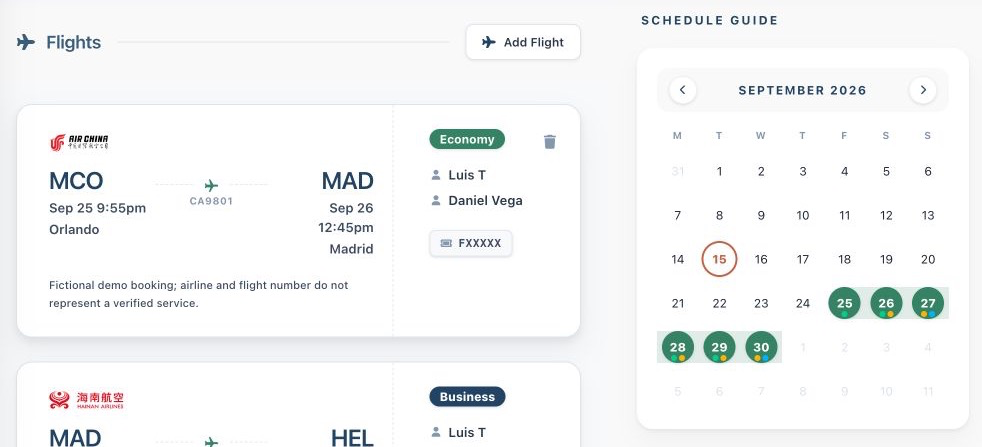
To keep your flight details, reference codes, and schedule milestones aligned in one place, you can centralize your logistics with Suitcase2Go. Rather than digging through old email confirmations to find your ticket numbers, you can store your active flight confirmations, layover buffers, and daily planning details in a single structured dashboard.
Before you pack your bags, make a habit of running a 60-day and 14-day reservation audit. Checking the operating carrier's native portal, verifying that your connection times clear legal minimums, and confirming that your 13-digit e-ticket coupons are active ensures that you step up to the check-in desk with complete peace of mind.