
A single misplaced character on an airline ticket or an ambiguous date on a hotel reservation can disrupt an overseas itinerary before you clear the departure terminal. International travel reservations pass through multiple independent networks—airline Global Distribution Systems (GDS), national border screening manifests, regional rail ticketing engines, and localized hospitality databases. Each platform parses traveler identity, diacritics, and calendar conventions through distinct technical rules.
While an automated airline kiosk might tolerate a missing middle initial, border security systems can deny boarding if the passenger record diverges from legal travel documents. Performing a disciplined pre-departure audit ensures your bookings survive carrier scrutiny, automated gate readers, and foreign immigration checks.

The Technical Ground Rules: Why Name and Date Conflicts Occur
To conduct an effective audit, travelers need to understand what airline reservation systems and immigration authorities evaluate during check-in and border clearance.
The Source of Truth: The Passport Machine Readable Zone (MRZ)
Every international booking audit starts with your physical passport. When border authorities or automated e-gates scan your identity document, they read the two-line Machine Readable Zone (MRZ) located at the bottom of the biographical page. The global standards for this text are defined by the International Civil Aviation Organization in the ICAO Doc 9303-3 specifications.
Key constraints defined under ICAO Doc 9303-3 include:
- Permitted Character Set: The MRZ permits only uppercase Latin characters (
A–Z), numeric digits (0–9), and filler chevrons (<). Punctuation marks, hyphens, apostrophes, and spaces are completely prohibited. - Name Parsing: Primary identifiers (surnames) are placed first, separated by double chevrons (
<<) from secondary identifiers (given names), which are separated by single chevrons (<). - Diacritic Conversion: Accented letters and special characters (such as
é,ñ, or German umlauts likeüandä) cannot be stored in the MRZ. They are transliterated or converted according to official tables (for example,MüllerbecomesMUELLER, whilePeñabecomesPENA). - Encoded Date Strings: Dates of birth and document expiration dates appear strictly as six numeric digits in
YYMMDDformat, followed by a verification checksum digit.
Airline reservation engines communicate directly with border screening systems using these standardized MRZ conventions rather than the stylized Visual Inspection Zone (VIZ) displayed on the upper half of your passport page.
Border Manifests: Secure Flight and APIS Requirements
When traveling on commercial flights touching the United States, carriers must capture and transmit passenger identity elements under the 49 CFR § 1560.101 mandate governing Secure Flight Passenger Data (SFPD). For reservations made 72 hours or more before scheduled departure, airlines must collect and transmit full legal names, dates of birth, and gender indicators no later than 72 hours prior to departure. Reservations made within the 72-hour window require immediate collection and transmission at booking.
Similarly, commercial operators conducting cross-border international transit must file electronic manifests under the U.S. Customs and Border Protection APIS guidelines or comparable foreign frameworks, such as the European Entry/Exit System (EES) and the UK electronic border clearance system. These electronic manifests require exact matching of the traveler's legal surname, given names, date of birth, nationality, and document number against the physical passport presented at the gate.
Date Ambiguities: Middle-Endian, Little-Endian, and ISO 8601
Regional differences in numerical date formats represent another frequent operational hazard. The United States standardizes on Middle-Endian notation (MM/DD/YYYY), while Europe, Latin America, the United Kingdom, and many international transit operators rely on Little-Endian formatting (DD/MM/YYYY). A date written as 07/08/2027 signifies July 8 in Chicago, but August 7 in Paris or Rome.
The international standard for unambiguous digital exchange is the ISO 8601-1:2019 standard, which formats dates as YYYY-MM-DD (Year-Month-Day). However, consumer confirmation emails and third-party booking vouchers rarely use strict ISO formatting, creating widespread potential for day-and-month inversions across multi-segment itineraries.
System Discrepancy Breakdown: What Each Platform Displays
Different systems process the exact same traveler identity in distinct ways. The following table illustrates how a sample traveler name appears across various touchpoints:
| Document / System | Displayed Value | Underlying Rule |
|---|---|---|
| Passport Visual Page (VIZ) | Elena María Rostova-Smith |
National formatting, allows accents and hyphens |
| Passport MRZ Baseline | ROSTOVA<SMITH<<ELENA<MARIA |
ICAO Doc 9303 Latin A–Z only; chevrons replace punctuation |
| Airline PNR Name Line | ROSTOVASMITH/ELENAMARIAMS |
Legacy GDS compression; drops spaces and appends title |
| Backend Secure Flight (SFPD) | Elena Maria Rostova Smith |
Full legal name sent to TSA without special characters |
| Hotel Confirmation | Elena Rostova-Smith |
Commercial display; middle name often omitted |
| Regional Rail Ticket | ROSTOVA-SMITH, ELENA M. |
Regional format; accepts punctuation, truncates middle name |
Understanding these systematic transformations prevents travelers from confusing standard system compression with an actual ticketing error.
The 5-Step Pre-Departure Audit Workflow
Execute this five-step audit after booking your primary segments, and repeat it between 14 and 7 days prior to departure before carrier manifest windows lock down.
Step 1: Establish Your Master Name Baseline
Retrieve your passport and review the bottom two lines of the biographical page. Transcribe your primary identifier (surname) and secondary identifiers (given names) exactly as they appear between the chevrons.
- Example: If your visual passport displays "García-López, Sofia Inés", your MRZ baseline is
GARCIA<LOPEZ<<SOFIA<INES. - Record your exact spelling without hyphens, diacritics, or apostrophes. This string represents your universal baseline for all cross-border flights and international border entries.
Step 2: Audit Passenger Name Records (PNR) and Backend Manifests
Log into each airline booking via the carrier's direct website using your six-character alphanumeric booking reference. Evaluate two distinct sections of your reservation:
- Boarding Pass & PNR Display: Many airline booking engines compress first and middle names into a single uninterrupted string on ticket displays and boarding passes (such as
SMITH/JOHNADAMMR). This is normal GDS behavior and does not require intervention. - Secure Flight / APIS Fields: Navigate to "Traveler Details" or "Manage Booking." Confirm that your legal given names, middle names, surname, date of birth, and gender indicator match your passport baseline. Ensure your middle name is entered in the designated middle name box or alongside your first name, not left out of the backend identity record.
- Frequent Flyer Profiles: Check that your airline loyalty account name matches your passport baseline. A divergence (such as a missing middle name on the loyalty profile when the ticket carries one) can prevent automated boarding pass generation or suppress TSA PreCheck indicators.
Step 3: Normalize Dates to ISO 8601 Across Flights, Stays, and Rail
Examine every confirmation voucher—including international car rentals, boutique hotel stays, and regional rail carriers. Transcribe all arrival, departure, check-in, and check-out dates into YYYY-MM-DD.
| Reservation Segment | Raw Confirmation Text | Potential Ambiguity | Normalized ISO 8601 |
|---|---|---|---|
| Outbound Flight Departure | Dep: 04/05/2027 22:15 |
April 5 vs. May 4 | 2027-05-04 22:15 |
| Overnight Flight Arrival | Arr: 05/05/2027 11:30 (+1) |
Touches down next calendar day | 2027-05-05 11:30 |
| Hotel Stay Check-In | Check-in: 05/05/2027 |
Must align with flight landing | 2027-05-05 |
| Intercity Train Voucher | 06/05/2027 |
June 5 vs. May 6 | 2027-05-06 |
Crucial Boundary Check: Always verify overnight red-eye flights against lodging dates. If your transatlantic flight departs on the evening of May 4 and lands on the morning of May 5, your accommodation check-in date must be reserved for May 5. Reserving the hotel for May 4 results in a missed check-in and automatic cancellation as a no-show.

Step 4: Centralize Confirmations to Spot Cross-Timezone and Name Disconnects
Maintaining booking confirmations scattered across disparate confirmation emails makes comparative date auditing error-prone. Grouping your reservations into a unified interface provides a clear sequence of your travel days.
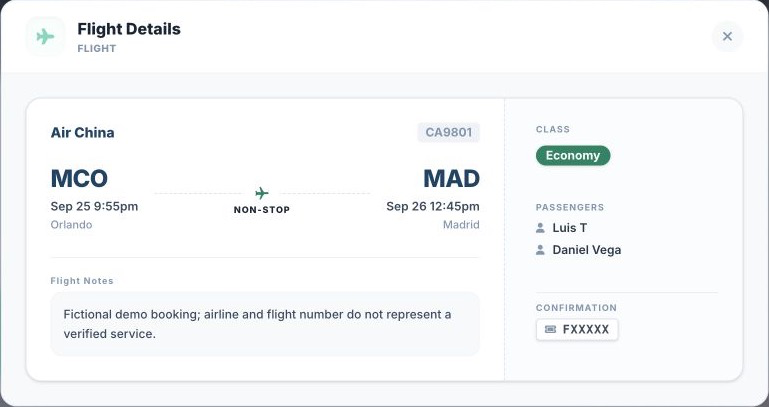
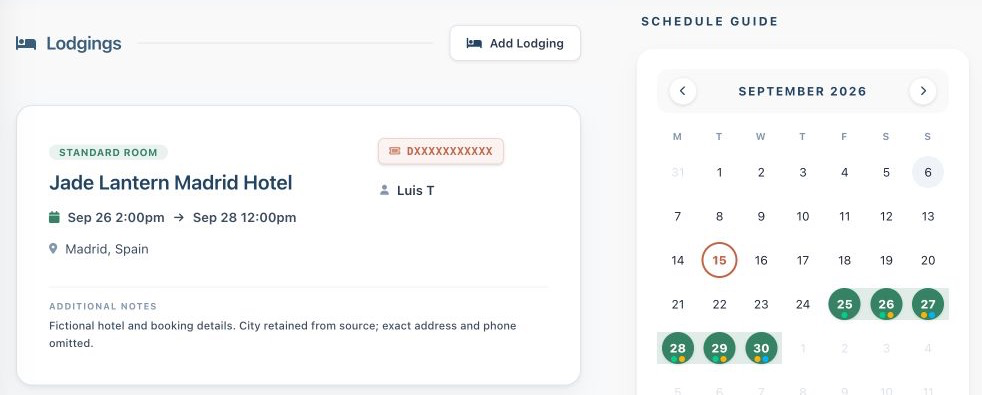
(The image above shows the Suitcase2Go web interface populated with fictional demo data to illustrate how reservation cards display stay dates, guest names, and reference codes for easy visual verification.)
Using a dedicated tool like Suitcase2Go allows travelers to organize trips with flights, stays, and daily plans in one structured dashboard. Through the Suitcase2Go web trip menu, travelers can access Booking Attachments & Emails to store original PDF receipts, rail vouchers, and confirmation emails alongside the master itinerary. Keeping documentation together makes it straightforward to compare guest names, check-in dates, and transfer windows across multiple providers.
Step 5: Triage and Rectify Discrepancies Before Transmission Cutoffs
If your audit uncovers a mismatched name or conflicting date, evaluate how to correct it based on carrier classification and policy windows.
- Name Corrections vs. Name Changes: Carriers maintain strict definitions separating minor corrections from prohibited ticket transfers. As documented in the American Airlines Name Correction Guidelines, airlines differentiate between a "Name Correction" (rectifying minor typographical errors, hyphenated names, inverted first and last names, or legal changes where passenger identity and Secure Flight data remain unchanged) and a "Name Change" (reassigning a ticket to another person, which is prohibited).
- Direct vs. Codeshare Bookings: Minor name adjustments on an itinerary involving only the ticketing carrier can often be processed within the original PNR. However, when itineraries include interline or codeshare partners, correcting a name often requires reissuing the ticket across all partner systems. Contact the airline that issued the ticket stock (the carrier whose ticket number appears on your receipt) rather than operating codeshare carriers.
- Lodging and Rail Rectification: For hotels or rail bookings displaying inverted day-and-month combinations, contact customer support or the property directly. Request an updated written confirmation showing the month spelled out in full (e.g., "5 May 2027") to eliminate misunderstandings with front-desk staff.
Complex Naming Scenarios: Best Practices
Certain naming conventions require specific formatting choices to prevent automated check-in failures:
Compound and Hyphenated Surnames
Travelers with dual surnames (standard across Spanish- and Portuguese-speaking countries) or hyphenated family names frequently find that airline booking fields reject spaces or hyphens. In accordance with ICAO MRZ rules, enter both surnames without punctuation (e.g., GARCIA LOPEZ or GARCIALOPEZ). Never omit your second surname to simplify the booking; border manifests compare against your complete legal surname.
Diacritical Marks and Punctuation
Names containing characters such as O'Connor, St. John, or Åström must be entered using standard Latin characters. Apostrophes and periods should be removed (OCONNOR, STJOHN). Scandinavian or Germanic characters should follow standard transliteration tables (Å to A or AA, Ö to OE, Ü to UE), mirroring the representation found in the bottom lines of your passport.
Middle Names vs. First Names
Airline reservation engines often do not mandate a separate middle name field during initial booking. As long as your middle name is recorded in the backend Secure Flight and APIS data, omitting the middle name from the printed ticket name line does not invalidate the ticket. However, if your first and middle names are merged on the boarding pass (e.g., JOHNDOUGLAS), do not attempt to alter it—this reflects standard legacy formatting.
The Manual Alternative: Building a Booking Audit Ledger
If you prefer managing your records manually rather than using an itinerary application, build an audit ledger before departure. Use a spreadsheet with seven dedicated columns:
- Segment Type: Flight, Rail, Lodging, or Activity
- Booking Reference (PNR / Confirmation): Six-character PNR or provider reference
- Operating Provider: The carrier or hotel brand managing the service
- Passenger Name as Booked: Verbatim string from the confirmation email
- Normalized Start Date: Converted to
YYYY-MM-DDwith local departure time - Normalized End Date: Converted to
YYYY-MM-DDwith local arrival time - Passport MRZ Alignment Status: Verified against bottom passport line (
Pass/Fail)
Systematically typing dates into YYYY-MM-DD notation forces you to reconcile whether 02/03 represents February 3 or March 2 before you arrive at an overseas departure gate with an invalid itinerary.