
Locking in an evening dinner reservation weeks before departure brings peace of mind, but on the ground it often causes friction. An afternoon museum line moves slower than expected, a neighborhood stroll leads to an intriguing street market, or transit delays push schedules back. Suddenly, lingering over a scenic viewpoint is replaced by a tense sprint back to your lodging to shower and reach a host stand before a strict cancellation cutoff.
Over-reserving turns a vacation into an inflexible series of appointments. Under-reserving, however, often leaves tired travelers settling for mediocre spots or waiting an hour on a cold sidewalk. Balancing memorable dining with open-ended daytime exploration requires treating reservations as intentional anchors rather than hourly handcuffs.

Here is a practical workflow to schedule evening meals strategically, manage cancellation rules, and keep daily itineraries adaptable.
The Core Framework: Anchor Meals vs. Flexible Evenings
To keep sightseeing flexible, divide your trip into distinct dining tiers rather than booking a formal sit-down table every single night.
- Anchor Evenings (Maximum 1–2 per trip leg): These are destinations where a table is the main event of your evening—such as a specific regional institution, a chef's tasting counter, or a venue requiring weeks of advance notice. On these days, the afternoon sightseeing schedule must be intentionally designed to support the dinner, not fight against it.
- Flex-Buffer Evenings: Evenings reserved for neighborhood exploration, casual bistros, walk-in wine bars, night markets, or venues with rapid table turnover. These nights contain no financial penalties and no scheduled check-in times.
- Standby Alerts: Utilizing real-time cancellation alerts for desirable tables rather than locking down fixed bookings weeks before knowing your physical energy level or weather conditions.
Adopting this ratio ensures you enjoy destination dining without feeling trapped by an unforgiving schedule every single night.

Understand Platform Rules Before You Book
Dining platforms enforce strict attendance and cancellation conditions. Understanding these parameters lets you build realistic buffers and avoid unexpected fees.
| Platform | Grace Period Default | Cancellation & No-Show Terms | Key Feature for Flexibility |
|---|---|---|---|
| Resy | 15 minutes unless otherwise noted | Individual restaurants set advance cancellation windows; failing to arrive or cancel within policy is logged as a no-show and repeated offenses risk account suspension under Resy Diner Terms of Service. | Automated waitlist monitoring via Resy Notify. |
| OpenTable | Set by individual host stand (typically 10–15 mins) | Restaurants configure advance notice windows (often 24–48 hours); four recorded no-shows within a rolling 12-month period trigger automatic account deactivation per OpenTable Diner Help Rules. | Direct in-app cancellation management across desktop and mobile. |
| Reserve with Google | Controlled by underlying partner platform | Managed directly in Google Maps; past the cutoff, modifications require direct merchant contact per Reserve with Google Booking Help. | Real-time digital waitlist queues displaying live party counts. |
| Tock | Set by venue | Standard reservations follow venue cancellation timelines, but prepaid or ticketed seatings are non-refundable by default via the consumer dashboard under Tock Help Center Reservation Policies. | Native ticket-transfer features to reassign bookings to others. |
Note: Holding grace periods are not uniform across the hospitality industry. While platforms like Resy state a 15-minute standard holding window in their legal terms, table holding policies are ultimately exercised at the discretion of the restaurant host stand.

The 5-Step Scheduling Workflow
Step 1: Cluster Activities Geographically
Never place an evening reservation on the opposite side of a major metro area from your late-afternoon activities. If your afternoon involves visiting an art gallery in an eastern district, book your dinner in that same neighborhood or directly adjacent to your hotel. Commuting across town during peak evening transit hours introduces unpredictable delays that threaten your booking.
Step 2: Establish the "90-Minute Airbag"
On nights with an Anchor Reservation, schedule an absolute stopping point for daytime activities at least 90 minutes before your table time—or two hours if your plan involves returning to your lodging first.
- 60 Minutes: Transit, weather buffer, and room refresh.
- 30 Minutes: Stroll to the venue, check in, and address any unexpected train reroutes or taxi delays.
Treating the start of this 90-minute window as your daily sightseeing finish line prevents late-afternoon schedule creep.
Step 3: Avoid Pre-Paid Bookings on High-Fatigue Days
Avoid scheduling prepaid tasting menus or non-refundable dining deposits—such as those booked through Tock Help Center Reservation Policies—on arrival days, days involving extensive regional train travel, or days with heavy outdoor walking. If your flight is delayed or walking fatigue sets in, you cannot easily postpone a prepaid ticket without forfeiting your payment or scrambling to find a transferee.
Step 4: Use Same-Day Waitlists and Real-Time Alerts
Rather than pre-booking an uncomfortably early table months ahead, leverage day-of platform features:
- Cancellation Alerts: If an in-demand venue is fully booked, set up custom monitoring windows via Resy Notify. Because restaurants experience natural same-day turnover as other diners' plans shift, seats often open between 12:00 PM and 4:00 PM on the day of service.
- Digital Queuing: Use live waitlists via Reserve with Google Booking Help to join a physical queue remotely while shopping, visiting a nearby park, or having an aperitif, avoiding wasted time idling at the door.
Step 5: Track Cancellation Deadlines in Your Itinerary
Set clear calendar reminders for when a restaurant's free cancellation period ends (often 24 to 48 hours prior). Evaluate your physical pacing on the morning of the cutoff day. If you realize your group is running low on energy or prefers a slower pace, cancel through the app or confirmation link before penalties kick in. Leaving an unwanted booking active risks immediate fees and platform account penalties outlined in OpenTable Diner Help Rules.
Worked Planning Example: A 3-Day Urban Itinerary
To see how this works in practice, examine this sample 3-day plan for a city getaway (fictional demonstration data):
Day 1: Arrival & Exploration (Flex-Buffer Evening)
  * 14:00 - Hotel check-in & unpack
  * 15:30 - Neighborhood walking tour & architectural sights
  * 18:30 - Pre-dinner aperitivo / tea break nearby
  * 19:30 - Open dining: Walk-in counter or join local digital waitlist
  * Flexibility Outcome: No cancellation risk if initial flights or transit run behind schedule.

Day 2: Cultural Sights & Anchor Dining (Structured Buffer)
  * 10:00 - Morning museum entry (ticketed)
  * 13:00 - Casual lunch near museum grounds
  * 14:30 - Local park exploration & historic center
  * 17:30 - Sightseeing Hard Stop (The 90-Minute Airbag)
  * 18:00 - Return to hotel, freshen up
  * 19:30 - Anchor Reservation: Regional Chef's Table (24-hr cancellation window verified)
  * Flexibility Outcome: Strict afternoon boundary ensures no rushing across town for dinner.

Day 3: Scenic Outskirts & Pop-Up Dining (Standby Alerts)
  * 10:30 - Day trip to outlying botanical gardens
  * 14:00 - Return to city center; Resy Notify alert active for popular bistro (19:00-20:30)
  * 16:30 - Afternoon alert claims opening at 19:45; confirm reservation
  * 19:45 - Relaxed dinner after an unhurried, spontaneous afternoon
  * Flexibility Outcome: Secured prime dining without locking in early-day commitments.
Organizing Confirmations and Plans in One Place
Managing disparate bookings—hotel stays, timed museum slots, transit tickets, and restaurant confirmations—across multiple apps often leads to fragmented planning. A confirmation sitting unread in an email inbox makes it easy to overlook a strict 24-hour cancellation deadline.
You can keep these logistical details structured using a spreadsheet or a dedicated travel tool like Suitcase2Go. Suitcase2Go helps you map out flights, stays, and daily plans in a single workspace. Using the Chrome extension, you can link your account, pick your target trip, and add reservation details directly from your browser screen to keep confirmation numbers and cancellation deadlines visible beside your daily itinerary.
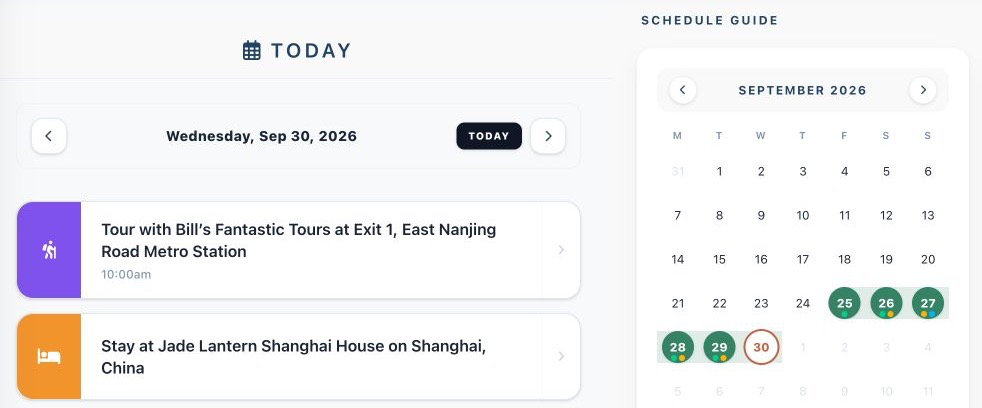
From the web dashboard, you can share trip details with travel partners via email, attach PDF confirmations, or print clean daily schedules. Consolidating your plans in one place helps you spot tight transit windows early, adjust bookings before penalties apply, and focus on enjoying your trip.